Mesh WirelessDrayTek's Mesh system connects and intelligently manages a group of VigorAPs over wireless. The Self-Optimising Mesh ensures your wireless network nodes are always using the fastest path to the Mesh Root.
Easy to Configure and ManageThe DrayTek Wireless app simplifies setting up your network. Optionally configure and monitor through one of DrayTek's management platforms - VigorACS cloud, VigorConnect, Router AP Management, or directly via the AP's Web Interface.
Auto-OptimisationMesh Nodes identify the best next hop and connect with it automatically. In case of a Mesh Node failure, the surrounding nodes automatically re-connect and resume service without downtime.
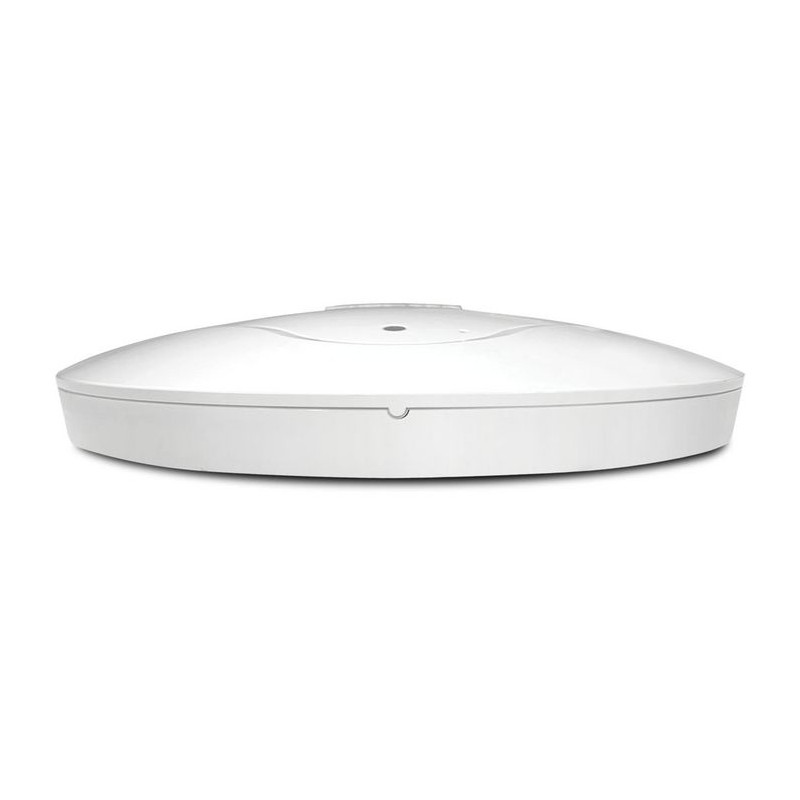
Ceiling MountingThe AP-912C shape blends well with most home or office interior. Its adaptable deployment options include ceilings and wall mounting. Includes secure ceiling mounting plate and easy to install mounting clips for suspended ceilings.
Gigabit Power Over EthernetThe VigorAP-912C can be powered through its Gigabit Ethernet interface with standard IEEE 802.3af PoE, for a tidier and more convenient installation.
Wireless Optimisation802.11ac Wave 2: Multi-User MIMO improves efficiency.
Band Steering: Allows 5GHz devices to achieve optimum speeds.
Airtime Fairness: Improves time management for wireless clients.
AP Assisted Roaming: Helps clients connect to the best AP.
Mesh WirelessMesh Wireless links VigorAP access points across both Wi-Fi and Wired links to cover a large area with a single Wireless network, spanning multiple Wireless Access Points and easily managed from the Mesh Root VigorAP or with the DrayTek Wireless app.
The Mesh Root VigorAP links up to your existing Internet router, such as the DrayTek Vigor 2862ac and additional VigorAPs join up as Mesh Nodes, which connect wirelessly to the Mesh Root.
Your devices see a single Wi-Fi network (SSID) and connect to the nearest VigorAP in the Mesh, instead of a distant Wi-Fi network with low signal. Internet connectivity relays through the Mesh, using the up to 866Mbps 5GHz wireless as the backhaul link, to relay between Mesh Nodes and avoid long waits for downloads.
Easy Setup with the DrayTek Wireless appDrayTek's Wireless app assists you with setting up VigorAP 912C access points and a Mesh Wireless network.
Once installed on your Smartphone or Tablet, use the Quick Start Wizard to set your VigorAPs to operate as a Mesh Wireless network. Set up a single VigorAP 912C as a stand-alone Access Point, or extend an existing wireless network as a Range Extender.
Simply scan the access point’s QR code to detect it, or manually input the VigorAPs default SSID & password, then configure your wireless network with step-by-step guidance.
When it’s all set up, view the Mesh Wireless status and connected wireless clients from the app.
Power-over-EthernetThe VigorAP 912C has built-in PoE (Standard IEEE 802.3af Power over Ethernet) as standard. Connect the VigorAP to a PoE-enabled Ethernet switch or PoE injector to power it without local power to the unit (power supply) - the VigorAP 912C will take its power from the Ethernet cable. The VigorAP 912C supports Gigabit PoE (if you have a Gigabit PoE switch/injector) such as our VigorSwitch P1280 or P1092 models (or any other 802.3af/at device).
PoE is ideal for situations where you do not have mains power available in the exact location where you want to install the VigorAP 912C or just for general aesthetic neatness, perhaps where the AP is installed somewhere prominent.
The DrayTek VigorAP 912C can alternatively be powered by an AC/DC mains PSU, for installations where you are not using PoE.
Ceiling MountingFor ceiling mounting, a circular mounting plate (included with the unit) is fitted and then the VigorAP 912C is secured into place by twisting the VigorAP into the mounting plate.
For suspended ceilings, additional mounts are included to attach to ceiling T-Bars (see later), clipping securely into place.
The AP-912C is designed to be installed on ceilings in order to serve the area below it. The cables (Ethernet or Power) can reach the AP-912C from the rear or the side. For solid ceiling fixing a backplate is supplied. The backplate fixes to the ceiling and the AP-912C then clips in. Alternatively, T-Bar mounts enable quick and easy attachments to suspended ceilings (see photo below). The AP-912C can also be wall-mounted - keyhole slots on the back allowing any orientation.
Dual Band 11ac Wave 2 Access PointThe VigorAP 912C is an 802.11ac Wave 2 access point, improving performance by increasing the amount of data that can be sent at one time. 11ac Wave 2 includes Multi User MIMO (Multiple In, Multiple Out) or MU-MIMO technology, further building upon the MIMO technologies introduced with 802.11n.
The VigorAP's MU-MIMO technology when used with MU-MIMO capable wireless clients, allows each antenna (or Spatial Stream) to send to separate wireless clients, potentially doubling the data transmission rate to clients.
Significant limitations of wireless throughput are the frequency space and radio time, shared between all users. A typical wireless access point can send data to only one client at a time with its radio. With enough users connected, congestion slows down transfer speeds more & more, as the AP divides its time between each client.
Multi User MIMO allows the VigorAP to send data out to more than one wireless client at a time, splitting bandwidth between the VigorAP's Spatial Streams instead of the access point's time as a whole.
This can be particularly useful in locations with many phones, tablet and laptops connecting, where the VigorAP's more efficient transmissions could allow each access point to serve more clients than an 802.11ac Wave 1 or 802.11n access point.
Wireless OptimisationDrayTek's VigorAP access points have many features designed to improve wireless performance on your network, to ensure that every wireless client gets the best possible experience.
Wireless Security & VLANsThe VigorAP 912C features multiple levels of wireless security. Encryption using WPA2 is available and you can also use the access control list (ACL) to specify the hardware addresses of clients which are permitted to connect (by MAC hardware address). Any unauthorised hardware is refused access.
For additional user authentication, you can have the VigorAP 912C authenticate clients with an 802.1x RADIUS (Remote Authentication Dial-in User Service) server, or use its internal RADIUS server.
The VigorAP 912C supports the 802.1q VLAN protocol so that if it is connected to an 802.1q enabled LAN, it can split tagged data (whether it's different subnets or intended for different users) and broadcast each on its own SSID. This means, for example, that your guest WiFi access is provided on a separate isolated SSID with no access to your company data.
Multi-SSID over MeshDrayTek's Mesh system supports 802.1q VLAN tagging for its multiple Wireless networks (or SSIDs), over both wireless and wired Mesh links between VigorAPs.
Each SSID provided by the Mesh network can have a VLAN tag assigned to it. VLAN tags are interpreted by the network's router and switch(es) to segregate one network from another. For instance keeping devices connecting to a guest network separate from resources on the private, internal network.
Setting up a Mesh network to work with VLANs only requires setting up the Mesh Root with the VLAN tags on its SSIDs. This change propagates to Mesh Nodes when syncing the configuration between access points and Multi-SSID over Mesh can be used just like a cabled network of access points.
AP & Repeater ModesThe VigorAP 912C can be used as a stand-alone Wireless Access Point, to provide wireless connectivity for a router or network that doesn't currently have wireless.
Access Point mode can create up to 4 separate Wireless networks (or SSIDs). The VigorAP 912C can provide completely separate private and guest wireless networks through the use of 802.1q VLAN tags with a router or network that supports VLAN tagging, such as the DrayTek Vigor 2862 router.
Range Extender (or Universal Repeater) mode allows the VigorAP 912C to extend the wireless coverage of any existing wireless network. In this mode, the VigorAP 912C connects to a remote wireless network, allowing it to provide Internet and Network access to wireless clients that connect to the VigorAP 912C's wireless network.
Mesh - Auto-OptimisationA DrayTek Mesh Wireless network can easily add new Mesh Nodes and self-organises links between up to 8 DrayTek VigorAP access points, to ensure the best possible speeds.
If a Mesh Node's wireless uplink drops out, for instance if there's interference or the VigorAP it connects to is turned off, each Mesh VigorAP automatically re-connects to the next available point to resumes service without any manual intervention required.
Mesh Nodes further away will connect wirelessly to the nearest Mesh Node, with up to 3 wireless hops.
Alternatively, where a network connection is available for a VigorAP, join a Mesh Node to the network through ethernet and nearby wireless Mesh Nodes can join it instead of the Mesh Root to reduce wireless hops and increase possible Mesh throughput.
Central Management with DrayTek VigorACSThe DrayTek VigorAP 912C can be managed by the DrayTek VigorACS central management system - a cloud platform which can manage most DrayTek products - routers, wireless access points and Ethernet switches, giving you complete visibility and control of your DrayTek product estate, even without a DrayTek Vigor router on site.
The DrayTek VigorACS management system can be used to configure and provision DrayTek VigorAP access points, similarly to performing these actions through the VigorAP's web interface, with a familiar menu layout in the Configuration section of VigorACS.
Profiles for groups of access points can be provisioned in VigorACS by selecting a VigorACS network, then accessing Configuration > AP Profile to configure profiles and apply them selectively.
DrayTek's VigorACS management monitors each VigorAP access point, with a Dashboard view giving a central overview of the most important information from the VigorAP's current status.
Central Management with a DrayTek RouterThe VigorAP 912C can operate in standalone autonomous mode, but can also form part of a centrally managed wireless installation by adding a compatible DrayTek wireless controller such as the Vigor 2862 router. This enables you to centrally control, manage and administer multiple AP devices installed around your building/campus. Management also enables efficient usage of your wireless access point through load-balancing, whereby wireless clients are distributed across several access points to reduce congestion.
The DrayTek router operating as the wireless controller can provision DrayTek VigorAP access points using the Central AP Management profiles configured on the router, with an option to Auto Provision - auto configuring newly installed VigorAP access points with the Auto Provisioning profile, upon initial connection to the DrayTek Vigor router's network.
- Mesh Wireless: Link up to 8 DrayTek VigorAP access points over wireless with Mesh. Mesh auto configures wireless links
- Easy to Configure and Manage: Setup of the VigorAP 912C is easy with the DrayTek Wireless app
- Dual-Band 11ac Wave 2 Access Point: Up to 866Mbps + 300Mbps total wireless bandwidth. Connect 128 clients per wireless band, 256 in total
- Wireless Security & VLANs: Secure your wireless networks with 802.1x and Access Control
- AP & Repeater Modes: Use the VigorAP 912C as an Access Point or extend an existing wireless network
- Central Management with VigorACS: Manage VigorAPs from the cloud with DrayTek VigorACS
- Power Over Ethernet: Power the VigorAP 912C through its Gigabit Ethernet cable with standard IEEE 802.3af PoE
- Ceiling Mounting: With the flexibility in mind, AP-912C is designed to be installed on ceilings and walls
- Wireless Optimisation: Band Steering, Airtime Fairness and AP-Assisted Mobility features help to improve wireless network efficiency
- Multi-SSID over Mesh: Provide separate wireless networks for 4 separate LANs over Mesh
- Mesh - Auto-Optimisation: DrayTek Mesh is Self-organising & Self-Healing to ensure reliable wireless connectivity
- Central Management with a DrayTek Router: Manage, monitor and provision VigorAPs connected to a DrayTek Vigor router
Spezifikationen
Design
| Platzierung | Ceiling/Wall |
| Produktfarbe | White |
| Reset-Knopf | Yes |
Features
| 2,4 GHz | Yes |
| 5 GHz | Yes |
| Auto MDI/MDI-X | Yes |
| Auto-Negotiation im Duplex-Modus | Yes |
| Automatische Kanalwahl | Yes |
| Automatischer Kanalsuchlauf | Yes |
| Dynamische Frequenzauswahl (DFS) | Yes |
| Ethernet-LAN-Datenraten | 10/100/1000 Mbit/s |
| Frequenzband | 2.4 - 5.8 GHz |
| Kabellose Isolierung | Yes |
| Maximum Datenübertragungsrate | 1200 Mbit/s |
| Maximum Datenübertragungsrate (2,4 GHz) | 300 Mbit/s |
| Maximum Datenübertragungsrate (5 GHz) | 866 Mbit/s |
| Netzwerkstandards | IEEE 802.11a/IEEE 802.11ac/IEEE 802.11b/IEEE 802.11g/IEEE 802.11n/IEEE 802.1Q/IEEE 802.1x/IEEE 802.3af |
| Quality of Service (QoS)-Unterstützung | Yes |
| Unterstützung der Flusskontrolle | Yes |
| Verkabelungstechnik | 10/100/1000Base-T(X) |
| VLAN-Unterstützung | Yes |
| Vollduplex | Yes |
| WLAN-Multimedia (WMM)/(WME) | Yes |
Management features
| Befehlszeilenschnittstelle (CLI) | Yes |
| Firmware aktualisierbar | Yes |
| Syslog | Yes |
| Webbasierte Verwaltung | Yes |
Packaging content
| Kabel enthalten | LAN (RJ-45) |
| Menge pro Packung | 1 Stück(e) |
| Montage Kits | Yes |
| Schnellstartanleitung | Yes |
Ports & interfaces
| DC-Eingangsbuchse | Yes |
| Ethernet-LAN-Anschlüsse (RJ-45) | 1 |
Power
| AC-Eingangsfrequenz | 50 - 60 Hz |
| AC-Eingangsspannung | 100 - 240 V |
| Ausgangsspannung | 12 V |
| Stromverbrauch (typisch) | 10 W |
| Stromversorgung über Ethernet (PoE) | Yes |
Protocols
| DHCP-Client | Yes |
| DHCP-Server | Yes |
| IPv4- und IPv6-Funktionen | IPv4/IPv6 access-control list (ACL)/IPv6 portal/IPv6 Telnet |
Security
| DHCP-Snooping | Yes |
| IP-Adressfilterung | Yes |
| MAC-Adressfilterung | Yes |
| Remote Authentication Dial-In User Service (RADIUS) | Yes |
| Service Set Identifier (SSID)-Funktionen | Hidden SSID/Multiple SSIDs |
| Sicherheitsalgorithmen | 802.1x RADIUS/EAP-TLS/HTTPS/PEAP/SNMP/SNMPv2/SNMPv3/WPA2/WPA2-PSK/WPA3/WPA3-PSK/WPS |
| Zugriffskontrollliste (ACL) | Yes |
Vendor information
| Brand Name | Draytek |
| Warranty | 1 |