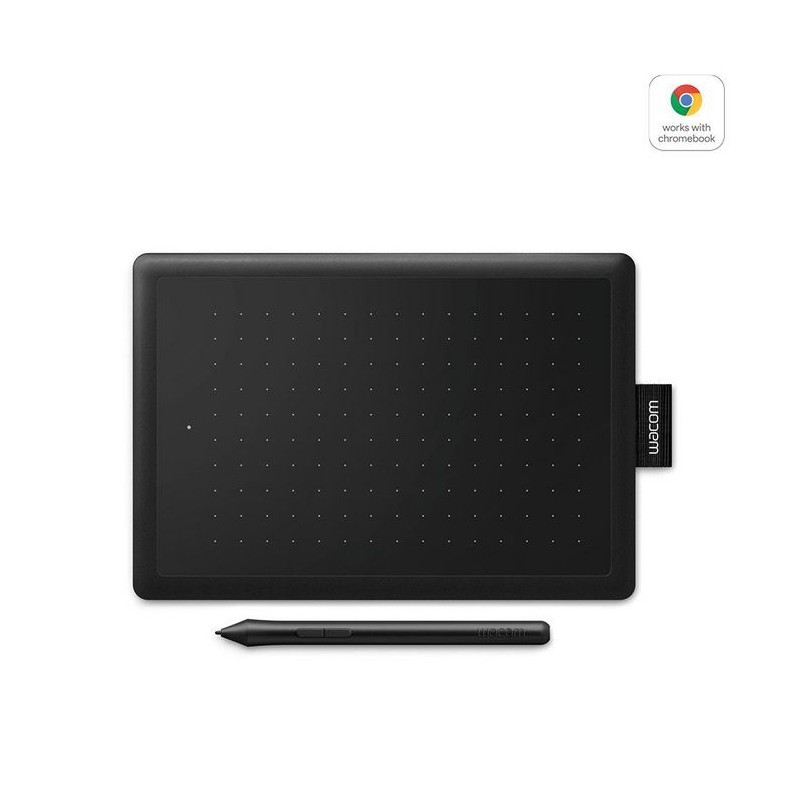
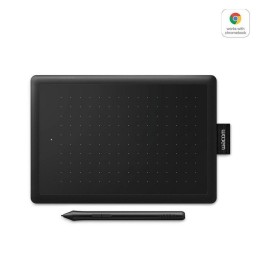
Digital creativity made easyYou and your computer in creative harmony. Sketch, draw and edit photos with a simply great pen experience. It couldn’t be easier.
The natural pen experienceA responsive, ergonomic, pressure-sensitive pen gives you a natural way to sketch, draw, paint or edit photos. The pen doesn’t need batteries, so it's lightweight, perfectly balanced and comfortable enough to use as long as you like. The drawing experience immediately feels familiar – like pen on paper.
Take your creativity to a new levelSketch and paint with more precision. Our advanced electro-magnetic pen technology gives you excellent control and accuracy. One by Wacom helps your art projects come out the way you’ve always wanted, by perfectly matching the movement of your pen. Editing photos? Everything from complicated cut-outs to delicate color adjustments are so much easier. Get ready for a load more ‘Likes’.
Your choice of versatile digital canvasChoose the size to suit you. Small takes up a tiny amount of your desk, but still gives enough workspace to create. Medium offers a larger area for broader strokes of the pen – and more room to express yourself. Both are compact enough to fit easily into your laptop bag too.
So simple to set upWhatever you want to create, it’s easy with One by Wacom. The tablet has everything you need, and nothing that you don’t, so it’s easy to get started on your next project. Just connect the USB cable to your Mac or PC, download and install the driver and you’re ready to go. Starting on that project really is that simple.
- Pressure-sensitive pen
- – perfectly matches your hand’s force and movement
- No batteries required – so the pen is lightweight and comfortable to use
- Easy plug-in via USB
- Compact, with more space to create
- Available in Medium and Small
Spécifications
Caractéristiques
| Couleur du produit | Noir |
| Prise en charge du système d'exploitation Mac | Mac OS X 10.10 Yosemite/Mac OS X 10.11 El Capitan/Mac OS X 10.12 Sierra/Mac OS X 10.2 Jaguar/Mac OS X 10.3 Panther/Mac OS X 10.4 Tiger/Mac OS X 10.5 Leopard/Mac OS X 10.6 Snow Leopard/Mac OS X 10.7 Lion/Mac OS X 10.8 Mountain Lion/Mac OS X 10.9 Mavericks/Oui |
| Prise en charge du système d'exploitation Windows | Windows 10/Windows 10 Education/Windows 10 Education x64/Windows 10 Enterprise/Windows 10 Enterprise x64/Windows 10 Home/Windows 10 Home x64/Windows 10 IOT Core/Windows 10 Pro/Windows 10 Pro x64/Windows 7/Windows 7 Enterprise/Windows 7 Enterprise x64/Windows 7 Home Basic/Windows 7 Home Basic x64/Windows 7 Home Premium/Windows 7 Home Premium x64/Windows 7 Professional/Windows 7 Professional x64/Windows 7 Starter/Windows 7 Starter x64/Windows 7 Ultimate/Windows 7 Ultimate x64/Windows 8/Windows 8 Enterprise x64/Windows 8 Pro/Windows 8 Pro x64/Windows 8 x64/Windows 8.1/Windows 8.1 Enterprise/Windows 8.1 Enterprise x64/Windows 8.1 Pro x64/Windows 8.1 x64 |
| Systèmes d'exploitation compatibles | Chrome OS 87 |
Configuration minimale du système
Connectivité
| Quantité de Ports USB 2.0 | 1 |
| Wifi | Non |
Contenu de l'emballage
| Câbles inclus | USB |
| Contenu de l'emballage | Pen, nib removal tool, quick start guide, regulation sheet |
| Guide de démarrage rapide | Oui |
| Nombre de plumes | 3 |
Crayon
| Espace de travail du stylo (WxD) | 152 x 95 mm |
| Niveaux de pression | 2048 |
| Stylo inclus | Oui |
| stylo sans batterie | Oui |
| stylo sans fil | Oui |
| Taux de réponse (points par seconde) | 133 points par seconde |
Poids et dimensions
| Dimensions du stylet L x D | 138.8 x 11.5 mm |
| Poids de la tablette | 260 g |
| Poids du stylet | 10 g |
Puissance
| Adaptateur secteur fourni | Non |
| Port de charge USB de type C | Non |
Souris
Tablette
| Espace de travail | 152 x 95 mm |
| Interface de l'appareil | USB |
| Résolution | 2540 lpi |
| tablette de type d'entrée | Stylo |
| Technologie de connectivité | Avec fil |
Vendor information